limited timeLock in our holiday pricing! Sale ends December 31!

How to Use Video in Email to Increase Clicks in 2026

Make your emails move: A step-by-step guide to turning Packsia videos into email-ready GIF’s.

How to Use Video in Email to Increase Clicks in 2026

Most email content can feel like a brochure from 2010. Static banners, squeezed layouts. But emails compete with feed-native experiences now. Our inboxes have trained us to scroll and pause on motion — that micro-moment of attention before our brain even reads a word.

And the data says motion works in emails when it’s done right.

Motion Gets Clicked

Multiple industry tests show that animated images can meaningfully boost key engagement metrics:

Movement catches attention faster than text or photos; even a short loop primes the eye to linger — and that extra dwell time correlates with clicks.

Beware: Bad GIFs Hurt More Than Help

GIFs add weight to your email. If they’re large files or used in multiples, that can:

  • Slow down load time in mobile inboxes.
  • Increase likelihood of clipping or deliverability issues if the email size spikes.
  • Distract users if the motion isn’t aligned with what you want them to click.

A mediocre GIF is just a louder static image. The goal isn’t motion for its own sake — it’s motion that drives action.

Best Practices Before You Hit “Send”

Based on practical insights from email marketers:

  • Keep it short. Ideally, your GIF should be under about 3 seconds.
  • Optimize file size. Large files slow email load time and can affect deliverability.
  • Use one key GIF per email. More than that and you risk email weight issues.
  • Design the first frame to tell the story. In some clients (like older Outlook), the first frame is all a viewer may see.
  • Include alt text. It’s essential for accessibility and for when images don’t load.
Moving pictures · from the Packsia library

desk days and planning sessions

Laptop Bag and Coffee on White Table – vertical stock video
Hands Typing on Laptop in Home Office – vertical stock video
Person Typing on Laptop at Desk – vertical stock video
Colleagues Working Together in Home Office – vertical stock video
Woman Typing on Laptop in Bed – vertical stock video
Laptop Displaying Flip Clock on Bed – vertical stock video
Woman Lying on Floor in High Heels – vertical stock video
Person Holding Iced Coffee in Home Office – vertical stock video
Woman Adjusting Iced Coffee on Laptop Workspace – vertical stock video
Laptop and Plant in Loft Workspace – vertical stock video
Woman Typing on Laptop in Home Office – vertical stock video
Woman Opening Laptop on the Floor – vertical stock video
Woman Closing Laptop at Desk Workspace – vertical stock video
Person Typing on Laptop in Modern Workspace – vertical stock video
Person Flipping through Daily Gratitude Journal – vertical stock video
Fitness Equipment and Laptop on Wooden Floor – vertical stock video
Woman Writing in Notebook at Workspace – vertical stock video
Woman Using Smartphone in Home Office – vertical stock video
Laptop and Headphones in Modern Workspace – vertical stock video
Woman Typing on Laptop in Cafe – vertical stock video

Quick Guide: How to Make a GIF from a Packsia Video in Canva

Here’s the workflow we recommend for email-ready GIFs:

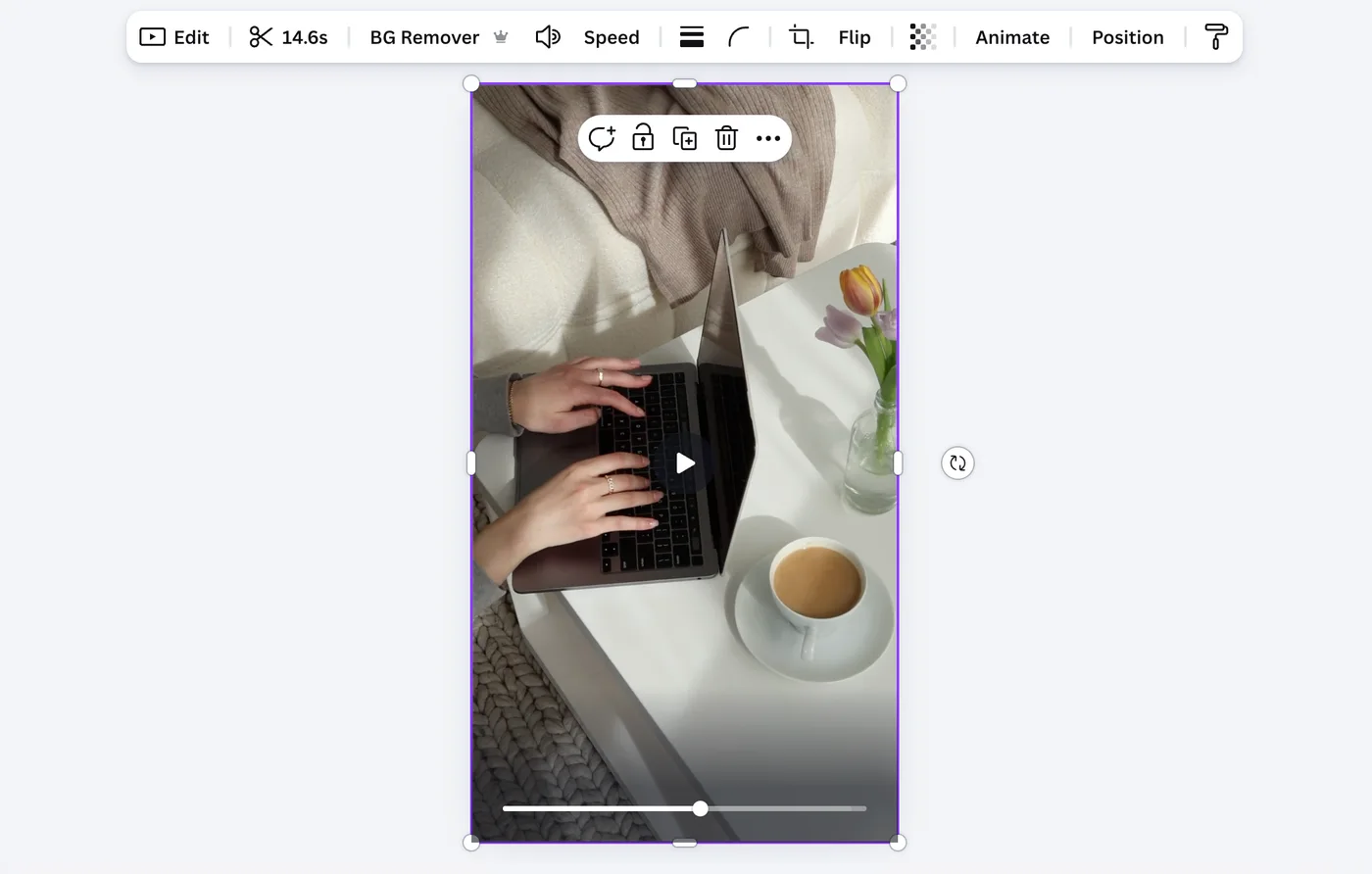
Step 1. Upload your Packsia video into your Canva project.

Start a new design. Drag your Packsia clip into the canvas. Keep your canvas 1080 pixels wide or smaller.

How to Use Video in Email to Increase Clicks in 2026

.

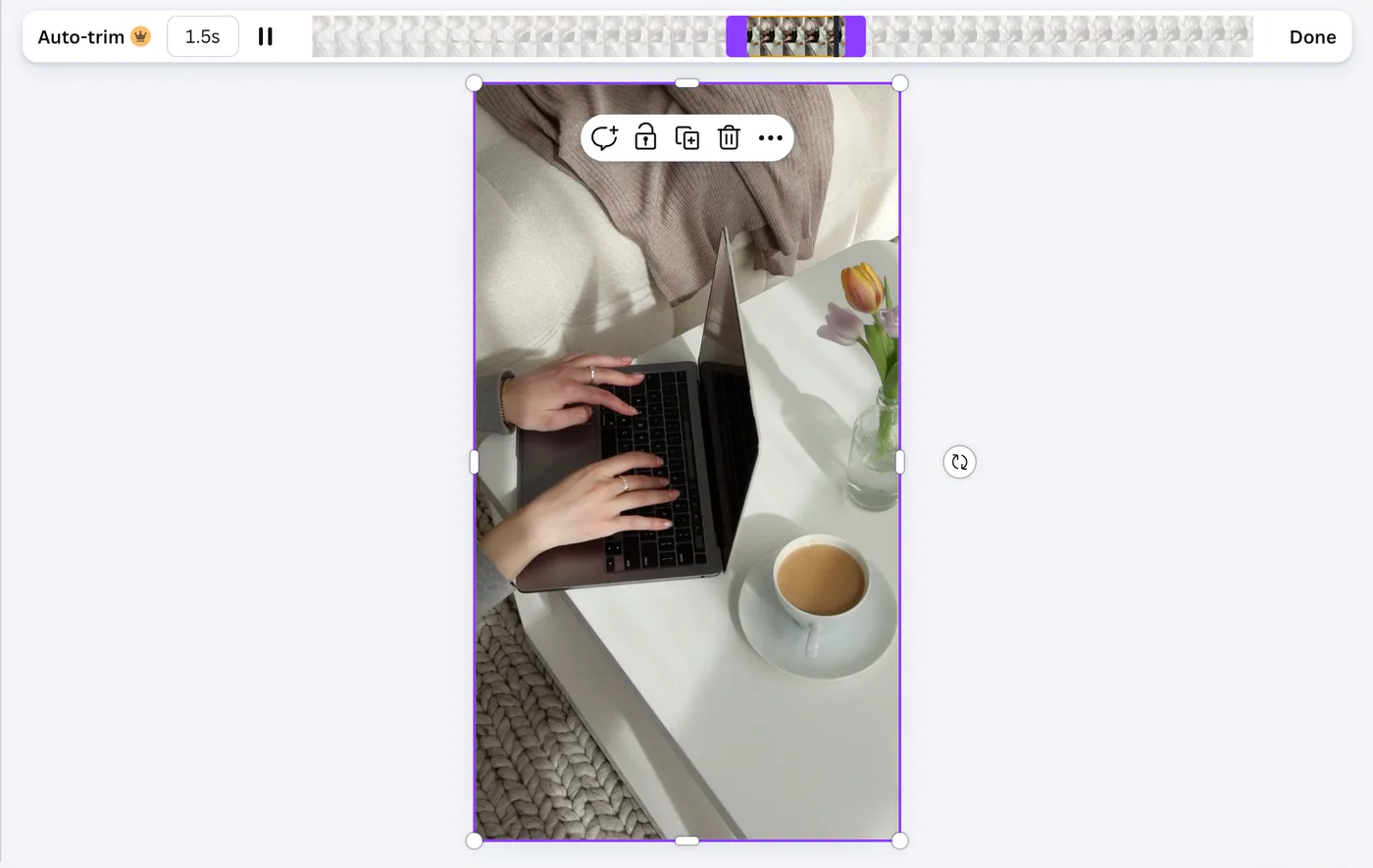
Step 2. Trim the video.

Keep it short. We recommend less than 3 seconds to ensure the final GIF file size stays light.

How to Use Video in Email to Increase Clicks in 2026

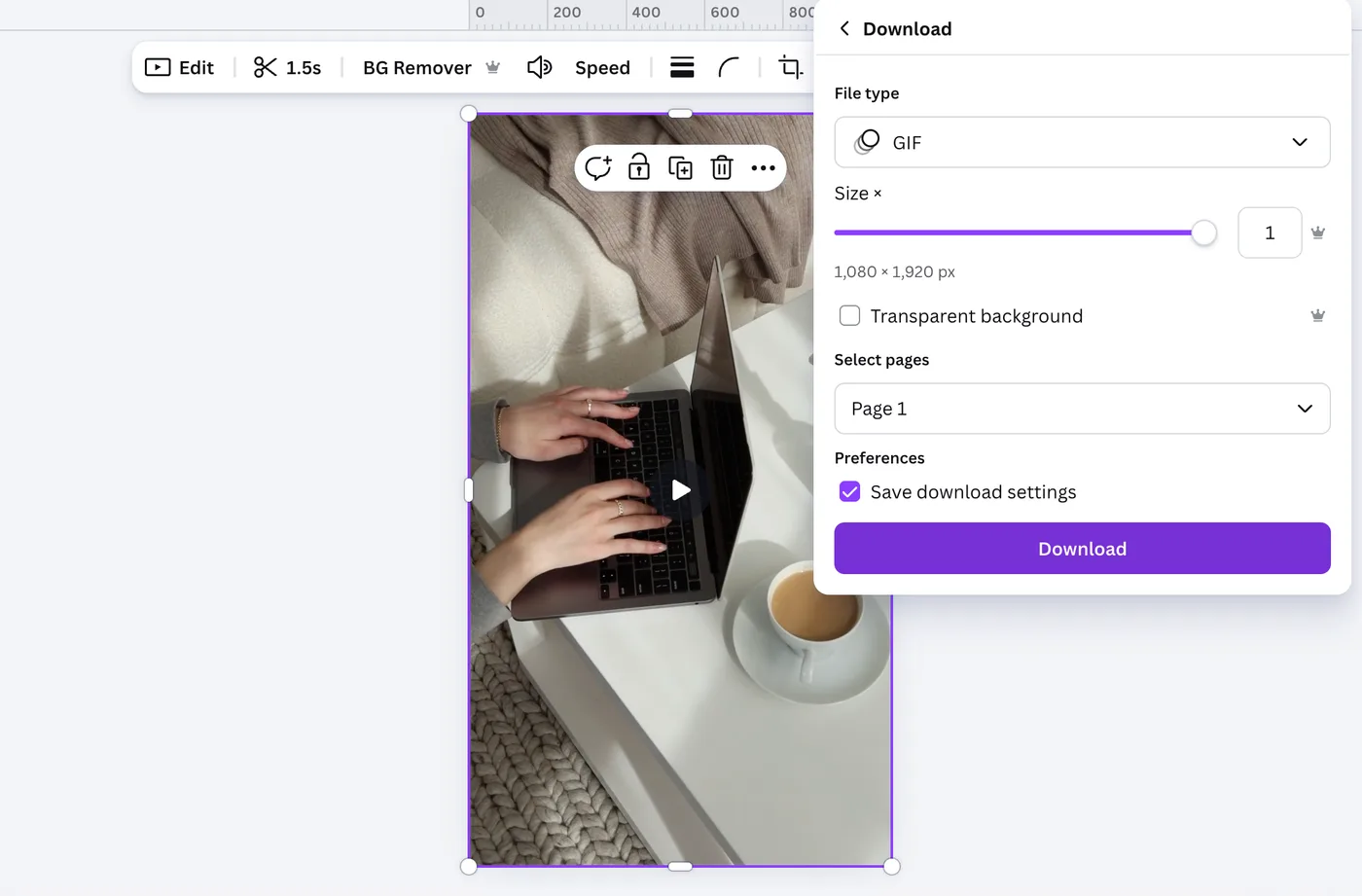
Step 3. Export as a GIF.

In the Export/Download menu choose GIF as the file type. Canva will render your short, looping animation.

How to Use Video in Email to Increase Clicks in 2026

Step 4. Upload to your email provider as an image.

Add it into your email content like you would a static image.

How to Use Video in Email to Increase Clicks in 2026

Note: Use only one GIF per email to avoid large file sizes that can slow loading or risk deliverability issues — especially on mobile.

The classifieds · curated packs

packs for the working week

Marketing

A/B Testing for Creators

Discover how creators and social media managers can use simple A/B testing strategies to boost engagement, refine content, and grow with confidence—without the guesswork.

find clips by topic, aesthetic, or vibe

content ready when you are

Thousands of on-brand videos in your pocket. No shoots, no licensing headaches, no waiting.

search by vibe

Find clips by aesthetic, color, topic or mood. Our smart search understands what you mean.

download or customize

Grab the clip as is, or edit in our AI Studio to add your product, swap the model or reimagine the shot.

post it

Commercially licensed and ready for any platform. Your next post, ad or campaign is ready in minutes.

LICENSING

one simple license

Post, create and advertise with confidence knowing you’re covered by our commercial licenses.

View license terms

WHO IT COVERS

Individuals

Creators & freelancers

Entrepreneurs

Solo founders & small businesses

Brands

In-house marketing teams

Agencies

Serving up to 3 clients

Looking for more coverage? Contact us about enterprise plans.

“Brands can tap into Packsia’s extensive collection of videos curated by faceless creators, aligning directly with their target audiences and seamlessly integrating them into their marketing efforts.”
Forbes

loved by brands, creators, agencies & marketers worldwide

FlodeskSummer FridaysBirkenstockLaterWeWoreWhatdaeBrit + CoSophia AmorusoJenna KutcherFlodeskSummer FridaysBirkenstockLaterWeWoreWhatdaeBrit + CoSophia AmorusoJenna Kutcher

scale your content

Post consistently without the stress, time, or cost of filming.

limited timeLock in our holiday pricing! Sale ends December 31!

FREE ACCOUNT

$0

free forever

  • purchase AI tokens a la carte
  • edit your own footage or start from scratch
  • scan your brand for magic recommendations
  • one free stock clip download
  • no access to our 10k+ curated library
  • no discount on additional token packs
Join now
most popular

membership

was $39now $29/mo

$348 billed yearly

save $192/year vs monthly

  • unlimited downloads of stock clips
  • full access to our 10k+ curated library
  • customize any clip or upload your own
  • 2,500 free AI tokens per year (~50 generations)
  • 10% off additional AI token packs
  • add up to 5 team members for just $19/mo each
  • cancel anytime

campaign pass

$99

one-time payment · 30 day access

Running a launch or seasonal campaign? Get unlimited access for 30 days, no subscription necessary.

  • unlimited downloads of stock clips for 30 days
  • full access to our 10k+ curated library
  • customize any clip or upload your own
  • 750 free AI tokens (~15 generations)
  • upgrade mid-pass for a credit towards your first subscription payment
  • can't add team members
  • no discount on additional token packs

your next post
is already here